
TekMatix Blog & Help Articles
Use the search bar below to look for help articles you need.
How To Use Smart Send to Optimize Your Email Campaigns in Tekmatix
How To Use Smart Send to Optimize Your Email Campaigns in Tekmatix
Why Smart Send Matters
Timing is everything in email marketing. Even the most compelling content can get overlooked if sent at the wrong moment. Tekmatix’s Smart Send feature analyzes your audience’s activity patterns and suggests the optimal send time for your emails, maximizing engagement and improving open and click rates.
Pro Tip: Smart Send leverages historical engagement data from the past 60 days, so it works best when your campaigns have consistent traffic and activity.
Key Benefits of Smart Send
Higher Engagement: Send emails when recipients are most active, improving open and click-through rates.
Integrated Experience: Smart Send is part of the existing Send & Schedule flow—no extra setup required.
Flexible Scheduling: Accept the recommended time or override it with a custom schedule.
Actionable Insights: Post-campaign analytics show the engagement lift compared to your usual results.
Prerequisites for Using Smart Send
Your Tekmatix account must have at least 1,000 delivered emails in the past 60 days for the target location.
Campaigns should have defined recipient lists so Smart Send can analyze historical engagement.
If your account doesn’t meet the threshold, Smart Send will appear disabled. Continue sending regular campaigns and it will automatically unlock once you reach eligibility.
Step-by-Step: Using Smart Send in Tekmatix
Step 1: Access the Email Builder
Go to Marketing & Emails → Email Builder.
Click Campaigns → Create New Campaign.

Step 2: Create Your Email Campaign
Design your email as usual.
Add your subject line, content, images, and links.
Step 3: Schedule Using Smart Send
Click Send or Schedule once your campaign is ready.
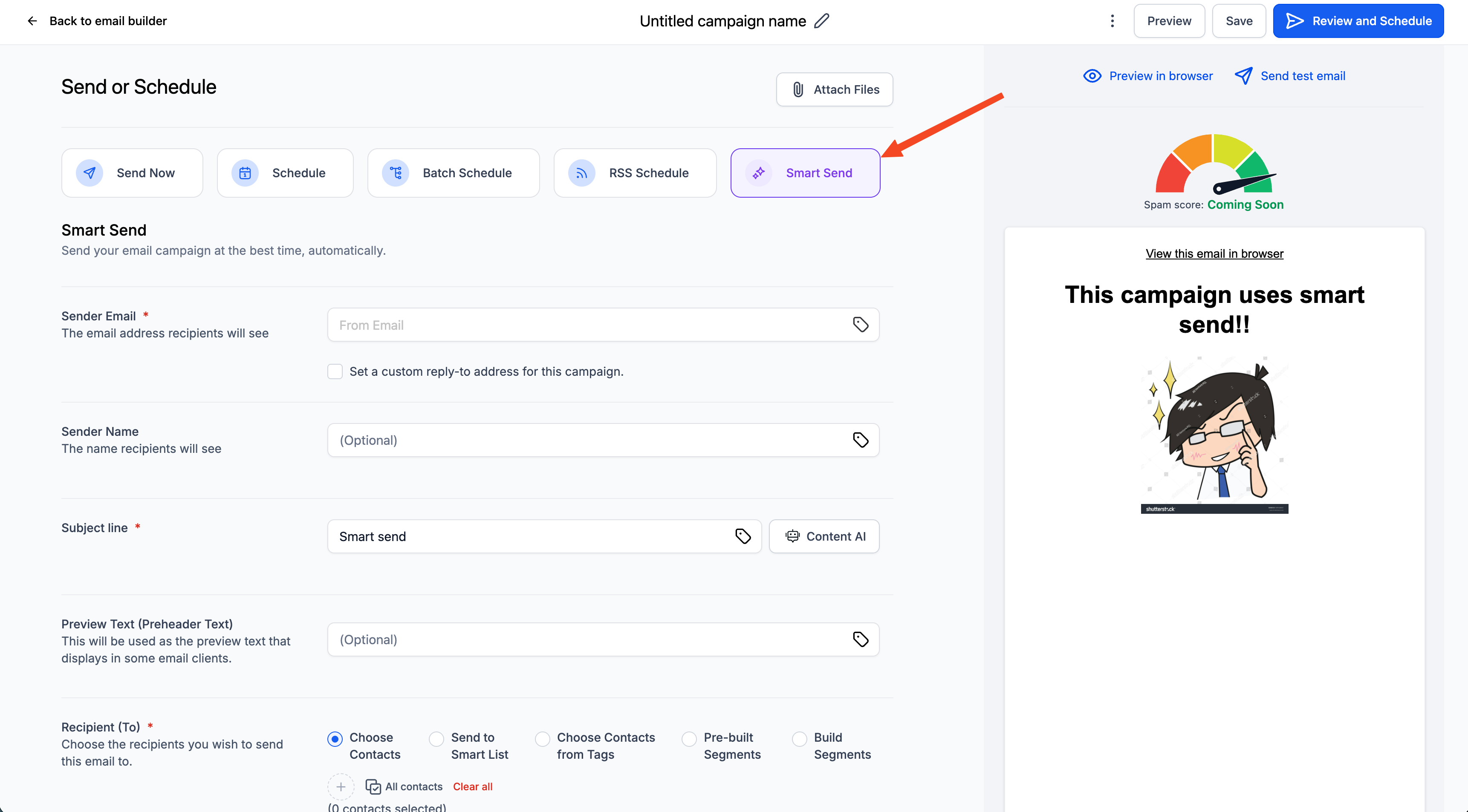
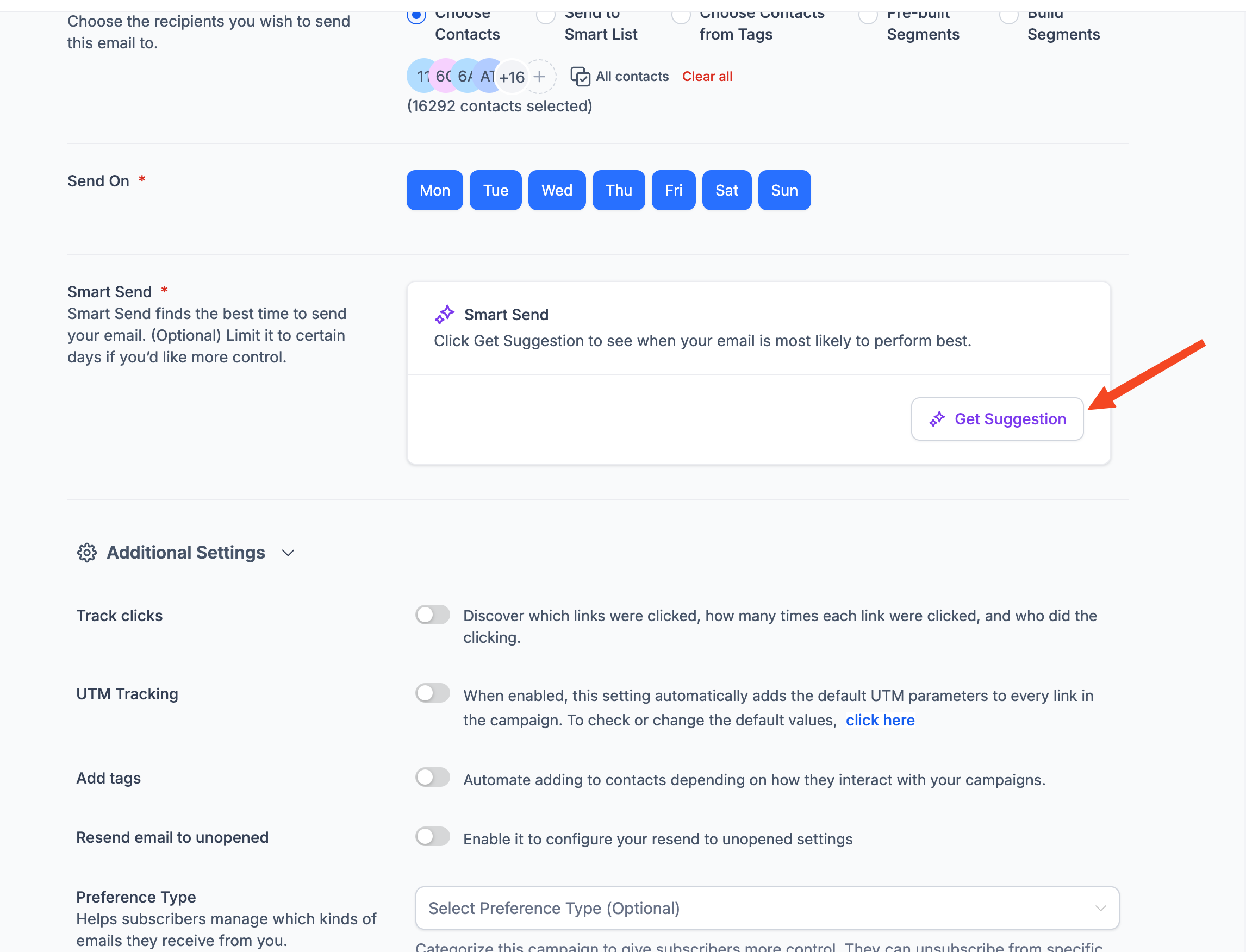
Select the Smart Send option.
Click Get Recommendation.
Tekmatix analyzes engagement data from the past 60 days and suggests the best send time.
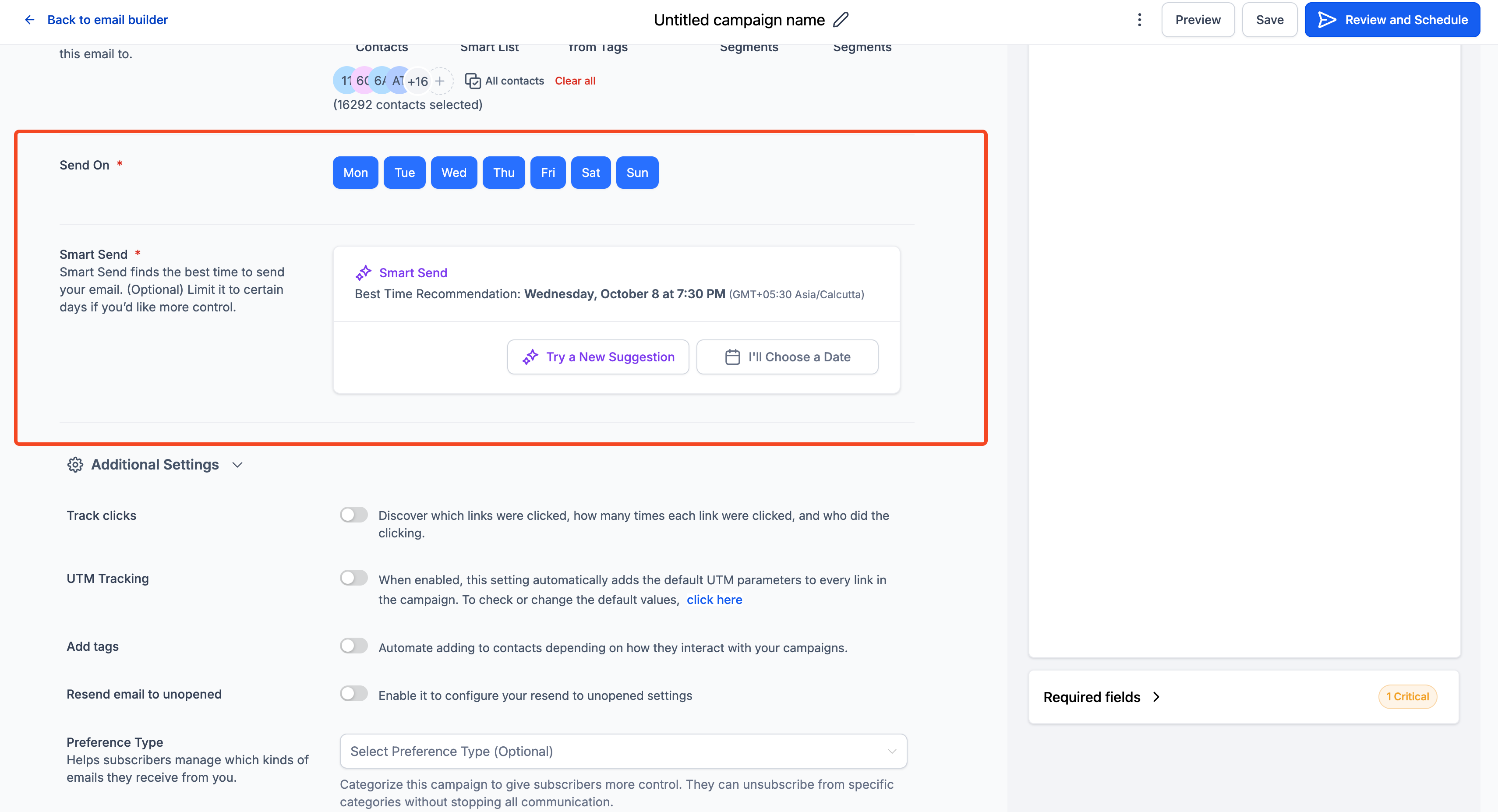
Step 4: Launch Campaign
Confirm the schedule and click Send.
Your campaign is queued and will be sent according to Smart Send or your custom schedule.
Step 5: Monitor Post-Campaign Analytics
Go to your campaign analytics dashboard to see the Smart Send engagement lift, showing how much better the campaign performed compared to your typical results.

How Smart Send Works
Reviews recipient activity (opens, clicks, and engagement) from the past 60 days.
Predicts the statistically optimal send time for maximum engagement.
Updates recommendations if recipient lists change or if the suggested time has passed.

Sample Scenario: Boosting Webinar Registration
Scenario:
A marketing agency wants to send a reminder email about an upcoming webinar to 5,000 subscribers. They typically send emails at 10:00 AM, but engagement has been low.
How They Use Tekmatix Smart Send:
Create a campaign in Marketing → Email Builder.
Draft the reminder email with subject, body, and registration link.
Click Send or Schedule → Smart Send → Get Recommendation.
Tekmatix suggests sending at 2:15 PM, the time with historically highest engagement for this audience.
Accept the recommendation and send.
Outcome:
Open rates increase by 20%.
More attendees register for the webinar.
Tekmatix analytics confirm the engagement lift compared to previous campaigns sent at 10:00 AM.
Frequently Asked Questions
Q: Can I override the Smart Send recommendation?
Yes. You can manually select any custom send time instead of using the suggested time.
Q: What if the suggested time has already passed?
Click Try New Suggestion, or the system will automatically adjust to the next closest available future time.
Q: What if my account doesn’t have enough historical data?
Smart Send will be disabled until your location has at least 1,000 delivered emails in the past 60 days. Keep sending regular campaigns, and it will unlock automatically.

Copyright © 2026 TekMatix. All rights reserved | [email protected]